
How to Add or Remove Curtain Track Gliders from Our Slimline Curtain track 😃
If you’ve got too many or too few gliders on your track, don’t worry — it’s a very quick fix. Watch the short video, then follow the simple steps below.
This demonstration features our Regular Curtain track (bays and straight). If you want to see how this works for the Slimline track, or our corded track then use the links below.

Add or remove gliders from the regular curtain track
Add or remove gliders from the corded curtain track
-
10-Year Guarantee
Free remake if it doesn’t fit — even if mis-measured
-
Video Measuring Guides
Short step-by-steps so you know it’s right
-
No Charge Per Bend
You pay for length only — big savings on multi-bend bays
-
Fast UK Delivery
Recyclable, eco-friendly packaging as standard
Video: 60-Second Add or Remove curtain Track Gliders – Slimline Track
How to Add or Remove Curtain Track Gliders
Introduction
Hi, I’m Lee Stevens from ezecurtains.co.uk. In this video, I’ll quickly show you how to remove and add gliders on our Slimline curtain tracks. This applies whether you’ve bought a straight track or a bay track.
Removing Gliders
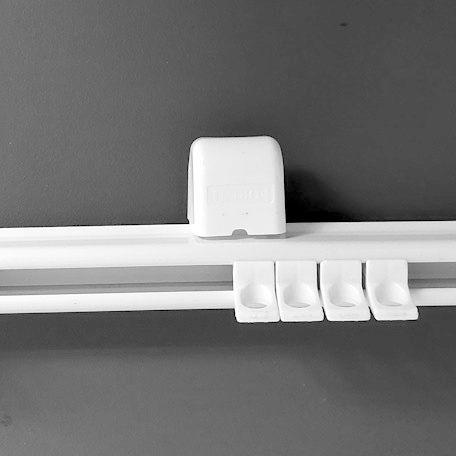
Here we have the track with the end stop locked in and the end cap on. To remove gliders:
- Hold the end stop, twist it, and lift it out.
- Remove the end cap.
- You can now take gliders out or add new ones back in.
- Once finished, put the end cap back on, drop the end stop into place, twist, and lock it securely.
Clipping Gliders In Without Removing the End Stop
It’s also possible to clip gliders directly into the track without taking the end stop and end cap off. However, you can only add gliders this way — not remove them.
How the Glider Design Works
Looking at the glider side-on, you’ll notice:
- A small slot alongside the two lugs at the top. This allows the glider to squeeze together and pop into the track.
- The eyelet at the bottom is offset to one side. This offset should face the room so your curtains hang freely in front of the track.
Adding a Glider
To add a glider:
- Hold the glider with the flat offset facing the front edge of the track.
- Place your thumb behind the glider and push it forward.
- You’ll hear it click into place — and that’s it!
Conclusion
And that’s all there is to it. Now you know how to remove and add gliders on our Slimline track quickly and easily. I hope this video was helpful — thank you for watching!
Quick Steps
- Remove gliders: Twist and lift out end stop → take off end cap → remove/add gliders → replace end cap and lock end stop.
- Clip gliders in: Push directly into the track (only for adding, not removing).
- Glider design: Slot lets them squeeze into the track. Offset eyelet should face the room so curtains hang freely.
- Add a glider: Hold offset facing front → push forward with thumb → glider clicks into place.
Why You Might Adjust Your Gliders
- You’re reusing curtains with a different heading and need more/fewer gliders.
- You want a fuller or lighter gather than standard.
- You’ve changed to a different heading style (e.g., pencil pleat vs pinch pleat).
At-a-Glance Cheat Sheet
- Standard rule of thumb for pencil pleat: approx. 20 gliders per metre of track (at ~2× fabric fullness).
- Reusing curtains? Hook them up and count the hooks — that’s how many gliders you need.
- Overlapping tracks: only use the outer ends to add/remove gliders.
Frequently Asked Questions
Yes — but I recommend you do it from the outside edges of the track as per the video above. It will be so much simpler.
No – You only need to use your fingers to complete this task.
As a quick guide, around 20 gliders per metre of track for pencil pleat at ~2× fullness. If you’re reusing curtains, count your hooks for an exact number.
The standard screws and red Uno wall/ceiling plugs are supplied with all out curtain tracks. You only need to buy the Spring toggles if you definitely need them. (See link below the video above)
Need a Hand?
Not sure how many gliders you need on your curtain track for your curtain heading style? Send me a quick photo of your curtains or track and I’ll tell you how many you will need.